
There’s two ways to see when a Google Calendar event was created. If you’re using G Suite, then the administrator will have access to an audit log that shows this detail. But if you’re using the free version of Google Calendar, then you’ll need to undertake a couple more steps.
- From Calendar settings export your Calendar. It will be downloaded as a zip file.
- Open the zip file and then open the icalendar file with Notepad or another text editor.
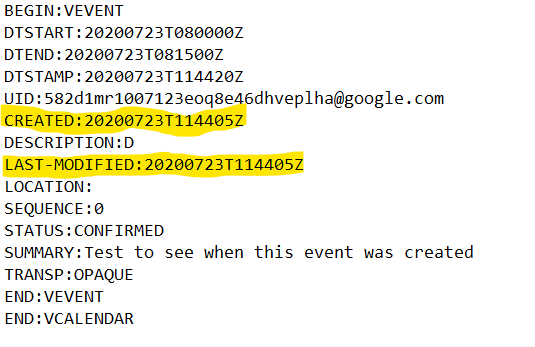
There’s a lot of information there but for each event you can see the date it was created as well as the date it was last modified.
The date is shown in YYYYMMDD with Greenwich Mean Time as well. So in my example the event was created on 23 July 2020 at 11:45am GMT and hasn’t been modified since then.